Enter durations. Toggle your days. The schedule does the math — and the field keeps it honest. No $2,000-a-seat desktop tool the crews never open, no spreadsheet that's wrong by Wednesday.
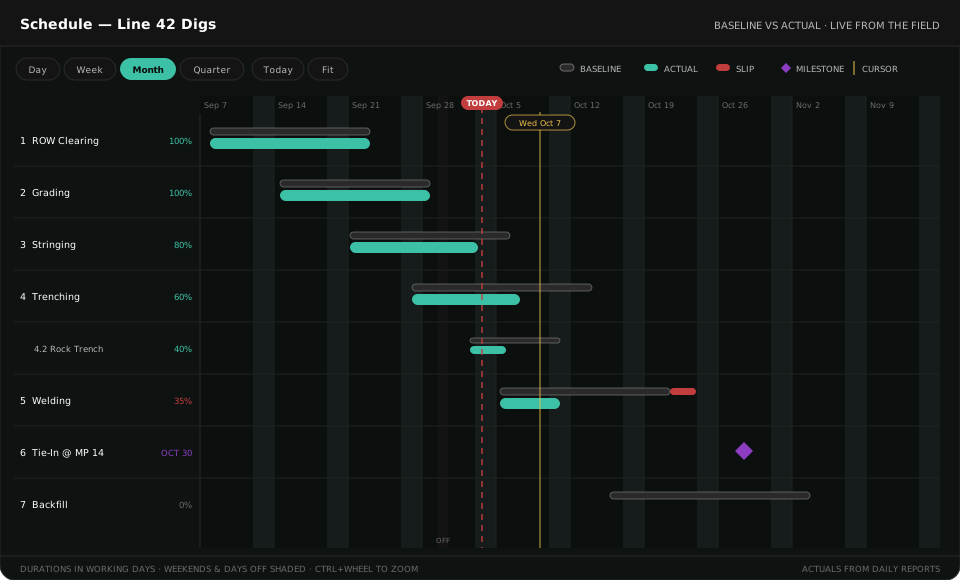
Every phase as a bar over time, expandable to its numbered tasks. Baseline vs actual side by side, slip in red, milestones as diamonds, % complete on the bar. Zoom Day to Quarter, and a Today button when you get lost.
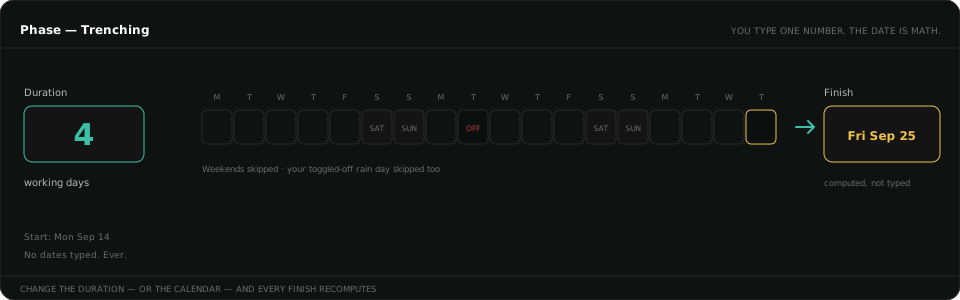
Tell it "Trenching takes 12 working days" and the finish computes itself — through your calendar, skipping weekends, holidays, and the days you've turned off. Change the duration, or the calendar, and every finish recomputes. Set a phase's start and its unplanned tasks inherit it.
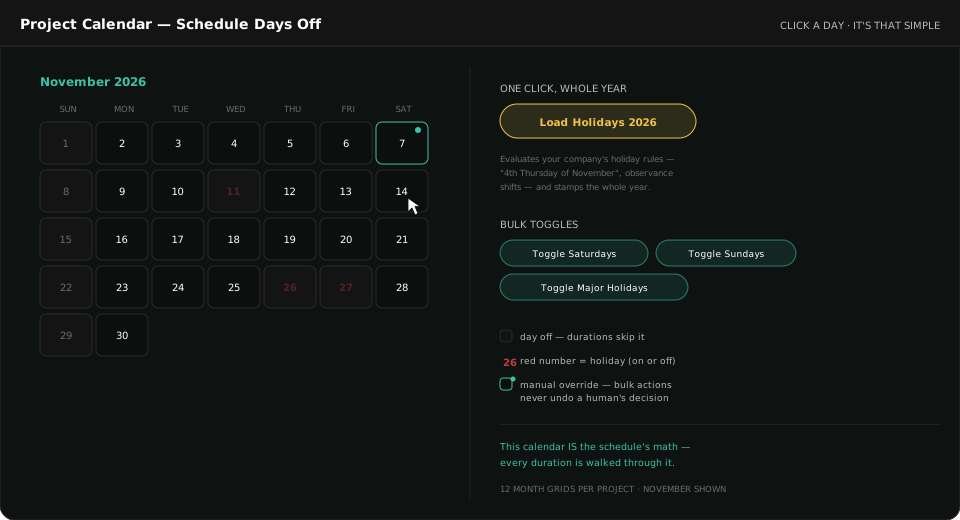
Every project gets a full-year working-day calendar. Click any day to toggle it. Load your company's holidays with one click — "4th Thursday of November" and all — and every holiday date shows a red number with its name. Hand-toggled days are remembered as manual overrides, and bulk actions never undo a decision a person made. The schedule, the calendar, and the field reports all read the same days.
Crews start and finish tasks from their phones through Phone Forms and Daily Reports. The schedule shows what was planned and what actually happened, side by side — without anyone re-typing a thing on Friday night.

A crew lead taps Start on a task in the morning and Done when it's finished. That's the whole data entry. Actual dates flow straight onto the schedule.

The gray bar is the plan. The teal bar is what's really happening. % complete rides on the bar, and the grid shows Baseline Start/Finish, Actual Start/Finish, and Status for every phase and task.

When actuals run past baseline, the slip draws itself in red on the chart and ticks up in the grid — days, not opinions. You see it Tuesday, not at the Friday meeting.

Click any phase or task to adjust its planned window right on the grid. No export-edit-import loop, no "final_v7" of the spreadsheet.
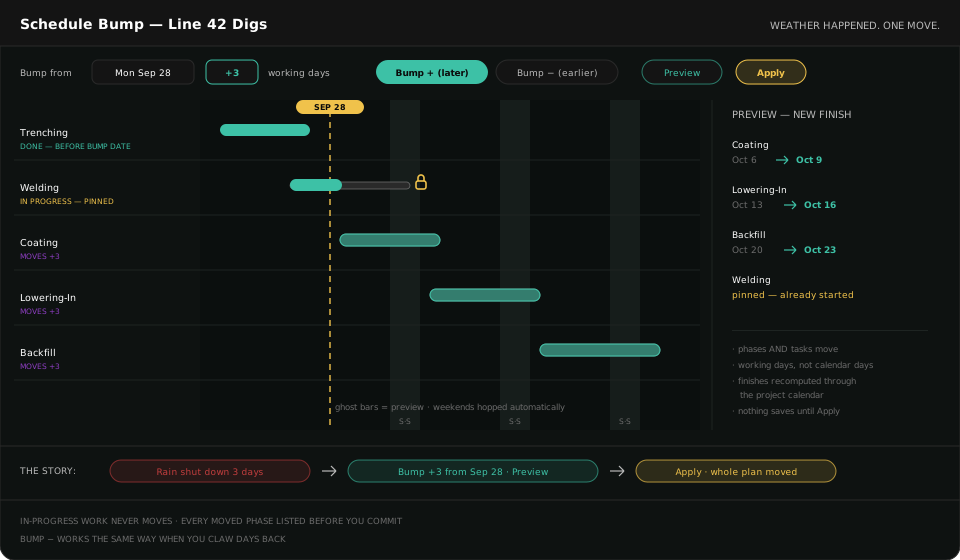
Schedule Bump shifts everything from a date by ±N working days — weekends and holidays skipped automatically. A full before/after preview comes first, anything the crews have already started is pinned and clearly listed, and nothing saves until you hit Apply.
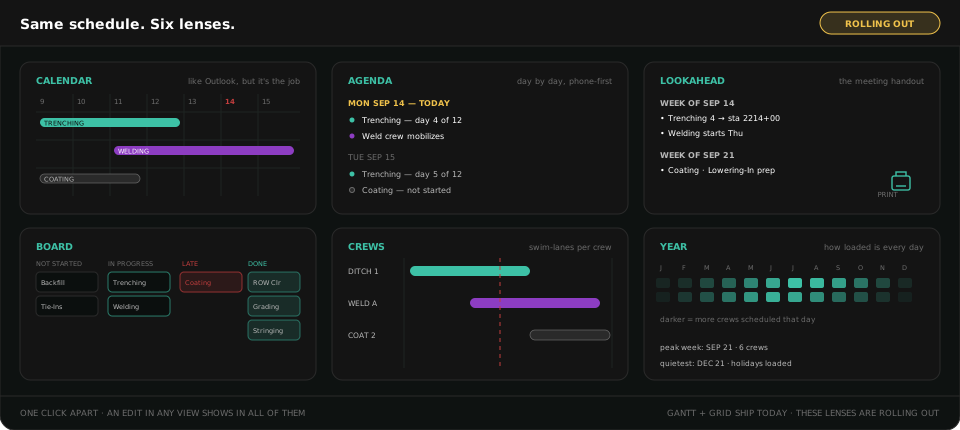
The Gantt is for the PM. The superintendent wants a calendar. The Monday meeting wants a lookahead handout. The office wants the grid. And it keeps growing — Calendar, Agenda, Lookahead, Board, Crews, and Year views are rolling out now, and an edit made in any of them shows in all of them.
There's also the Hot Potato Schedule — the area manager's rapid-fire "who's on what tomorrow" board that complements the big Schedule for day-to-day dispatch.
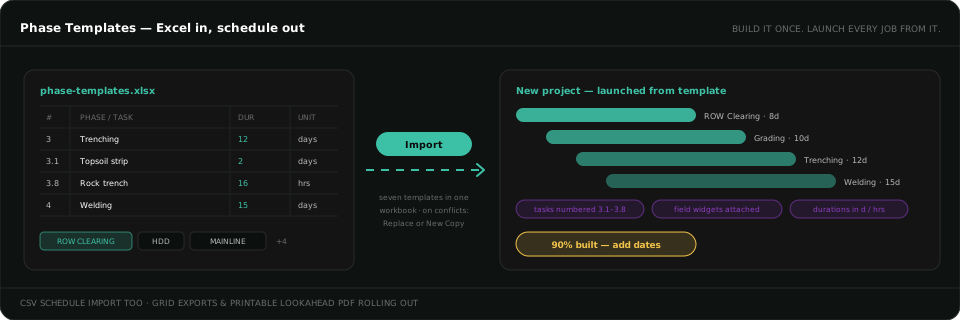
Your standard project types — ROW clearing, HDD, mainline — live as Phase Templates: phases, numbered tasks, durations in days or hours, and the field widgets each phase uses. Import a whole template — or seven — from one Excel workbook. Launch a project from a template and the schedule is built before anyone types a date.
The spreadsheet doesn't know your calendar, can't hear from the field, and is wrong by Wednesday. Here, durations do the date math, actuals arrive from phones, and slip computes itself.
Powerful — and parked on one scheduler's PC at $2,000 a seat. Pipeline Perfect is set up in minutes, connected to the crews, and part of the same platform as your daily reports and project map.
Durations through your calendar. One click of holidays. Bump when weather happens. Baseline vs actual from the field, in a browser, for the whole team.
The schedule, the calendar, and the field all read the same days — that's why the dates are real.
Thirty-minute walkthrough. We'll load your phases, toggle your calendar, and bump a week of weather — live.
Request a Demo